Your lectures, as notes you can actually study.

Notebot turns lecture slides, recordings and whiteboard photos into one dense, explained study note, then drills you on it in the format your exam uses. On your computer, in plain Markdown, with your own Gemini key. Free while it's in beta.

Notebot 1.2.1 · macOS 12 or newer · Apple silicon · 395 MB · Free during the beta

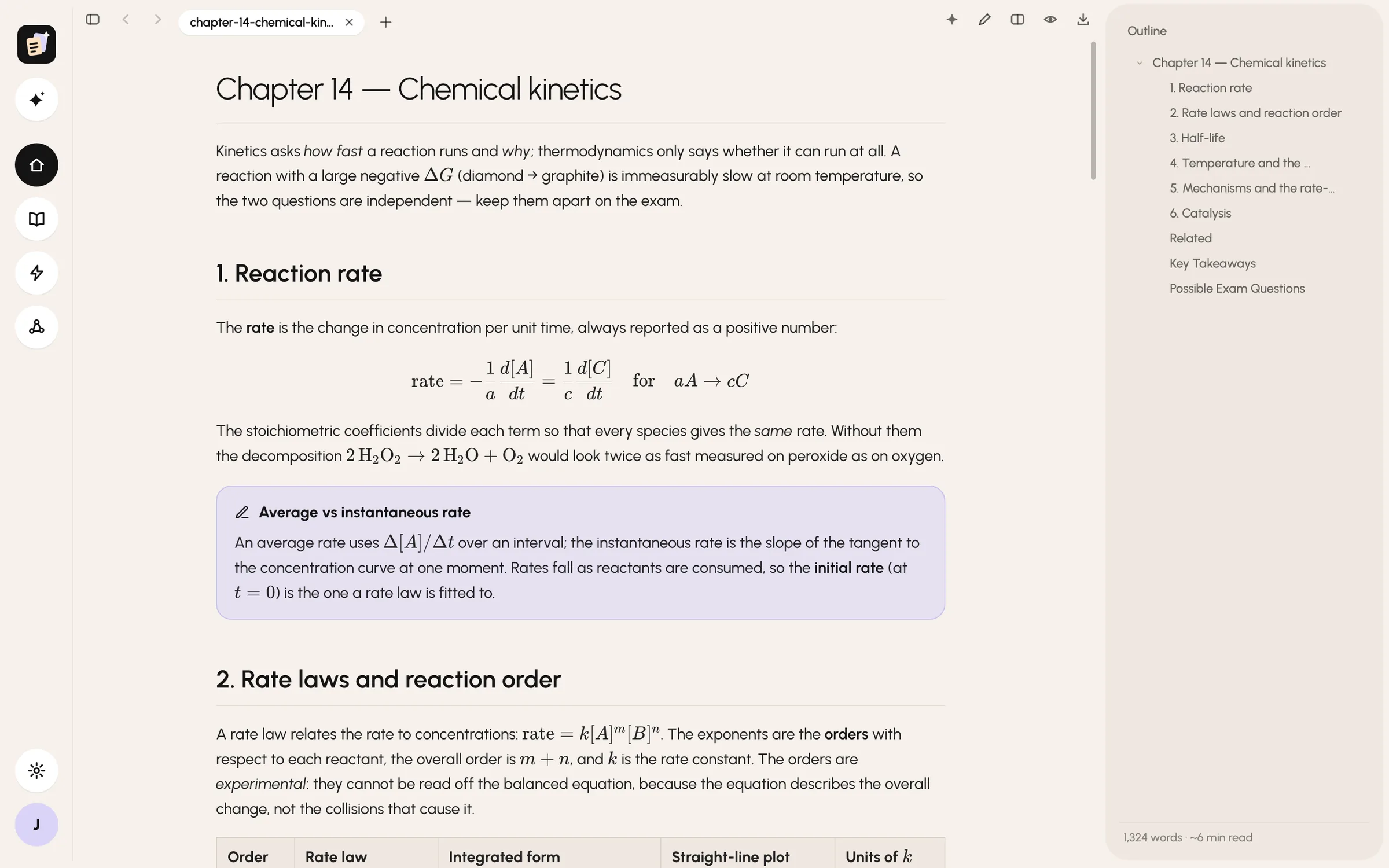
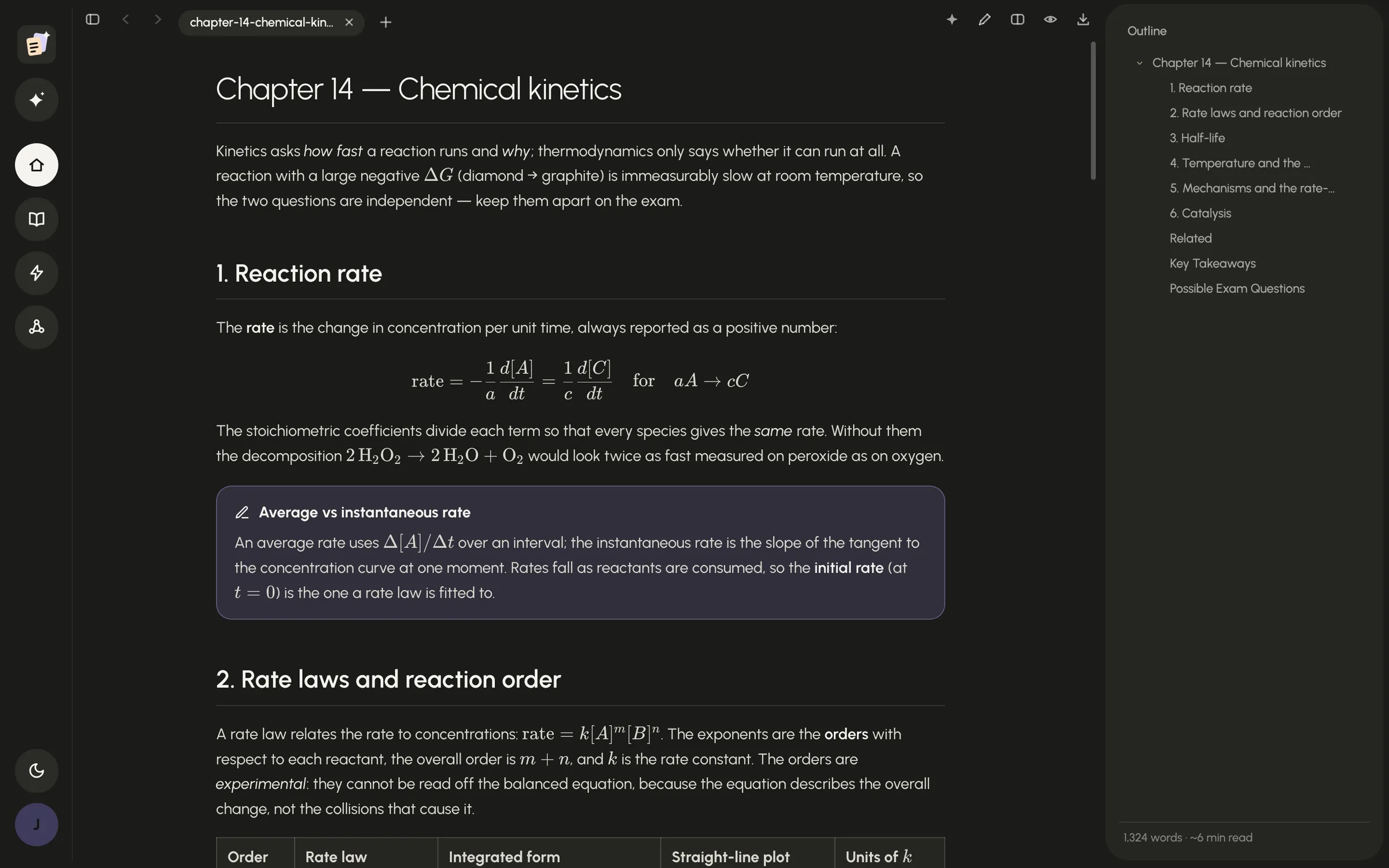
A note in Notebot: Chapter 14, Chemical kinetics. An overview, a section on reaction rate with its formula, a callout on average and instantaneous rate, the rate-law table starting, and the note's outline beside it.

A note Notebot wrote from a demo chemistry lecture, as you read it in the app.

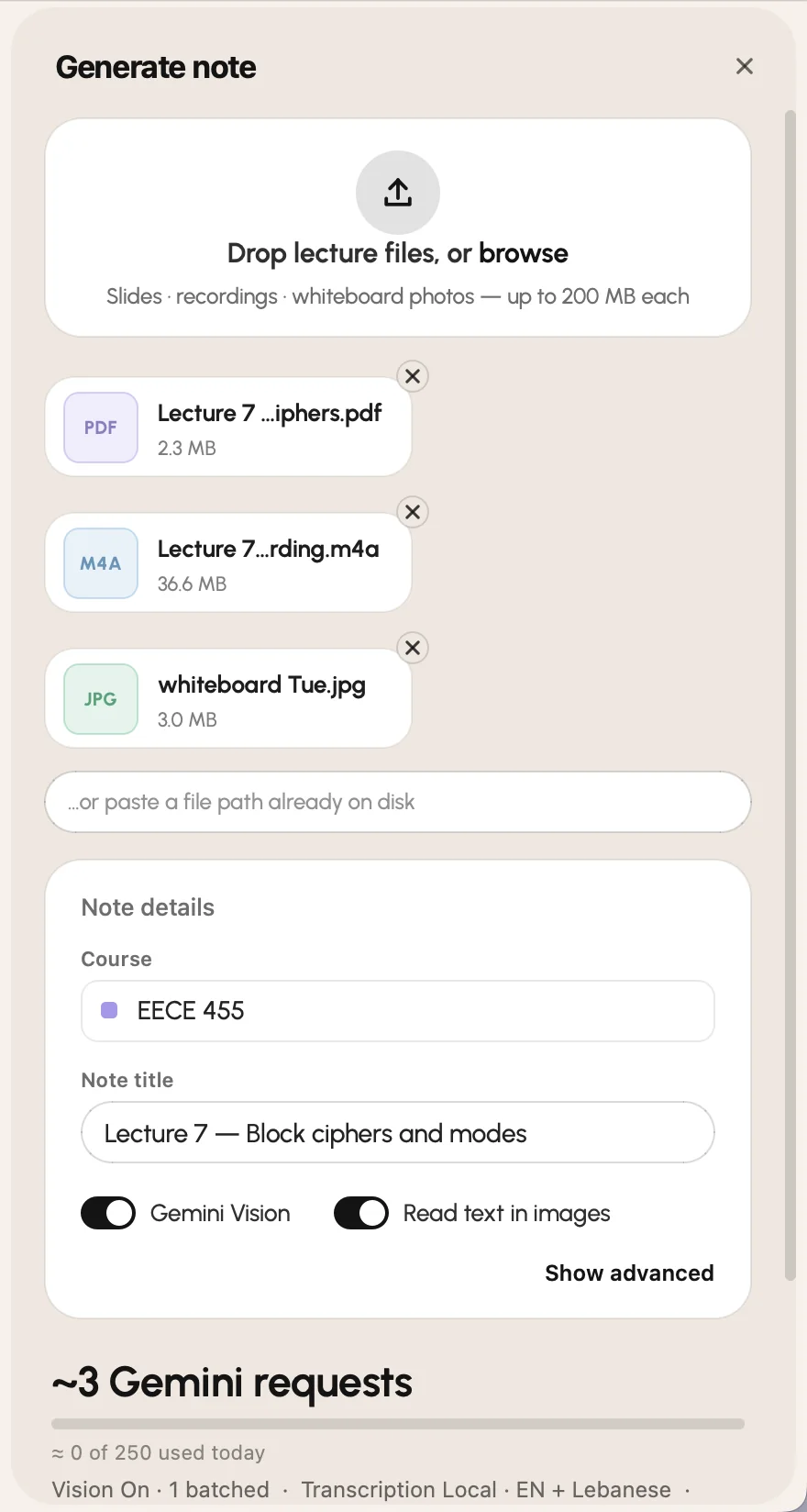
The generator panel: a drop zone holding a PDF, a recording and a whiteboard photo, the course and title, the request estimate with today's count, and the Run button.

Drop the lecture. Get the note.

The slides are the backbone: every bullet, formula and figure. The recording, your whiteboard photos and even the notes you typed in class are woven in where they belong, not tacked on as a transcript.

The note explains instead of transcribing: what each symbol in a formula means, why one step follows the next, the example the slide skipped. Then you read it in the app: maths set properly, callouts for definitions, tips and pitfalls, figures where the slide put them, one search box for every line of every note.

  • Slides, recordings and whiteboard photos, in any mix
  • Recordings transcribed on your computer
  • ⌘K search across every note · ⌘F inside one
  • Exam Lens, ⌘L · exam answers hidden until you ask
  • 2 to 16 requests a lecture on a free Gemini key, estimated before you run — a Claude or OpenAI key works too
Then it quizzes you the way your exam will.

Drill turns your notes into a practice exam: multiple choice, true or false, short answers, written problems, essays, in whatever mix your course tests. Use the questions already in your notes, let Notebot write new ones from them, or both. Every new question is checked before you see it.

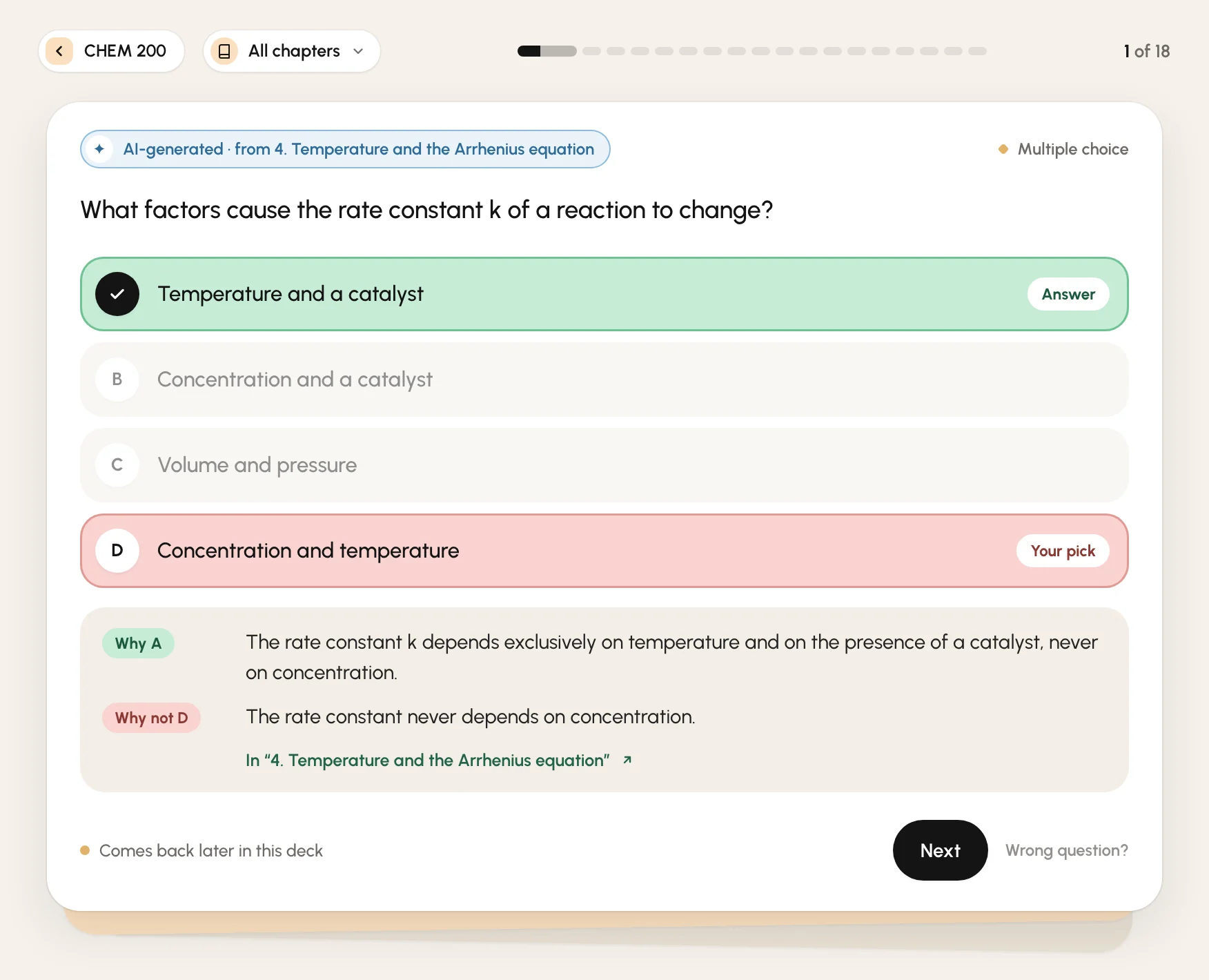
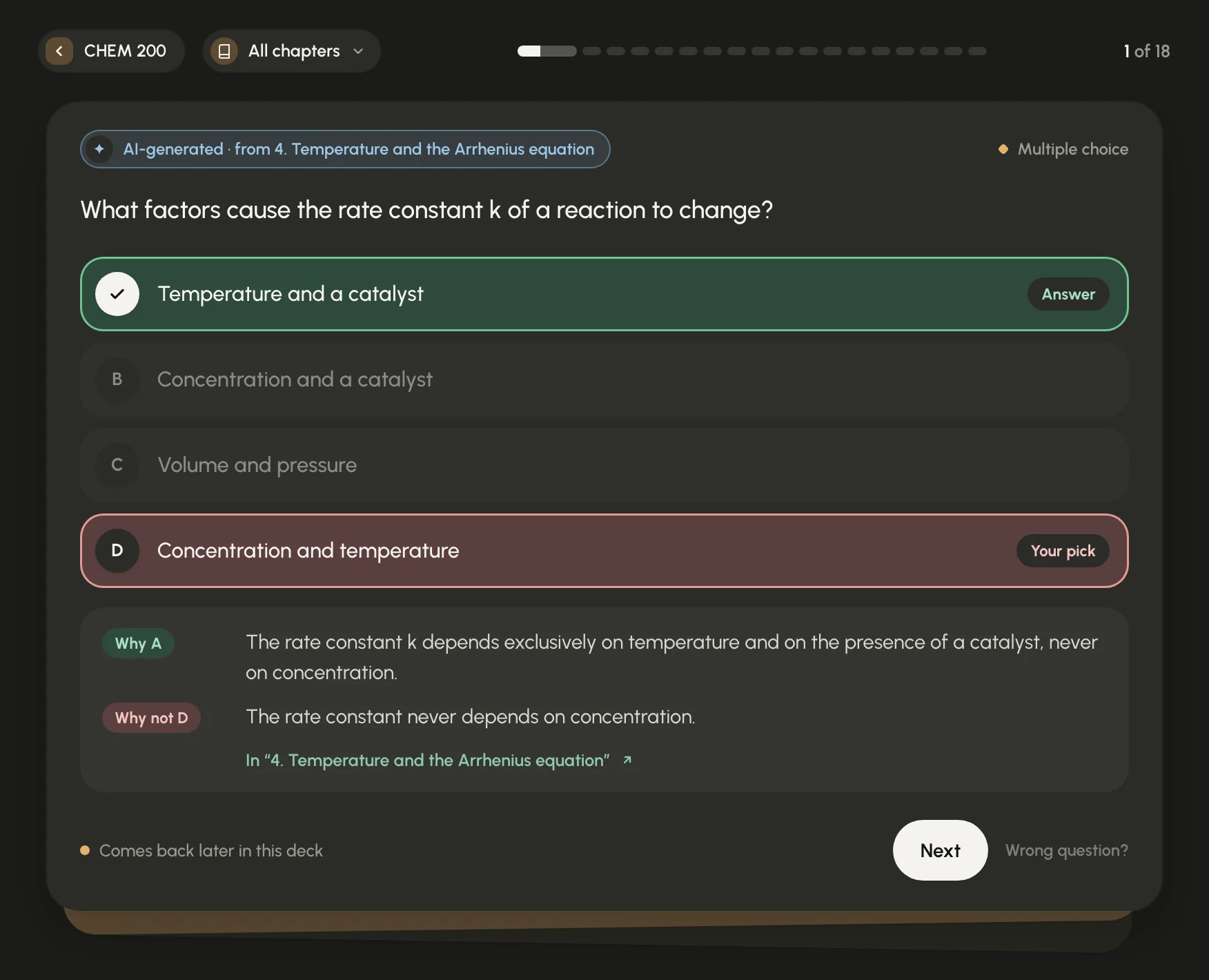
A Drill card: a multiple-choice question about what changes a reaction's rate constant, written by AI from a chemistry note and answered wrong. The right answer is marked, with why it is right, why the pick was wrong, and a link to the section of the note.
  • Says where it came from: a question from your notes, or one written from this section of them.
  • Why it's right, why yours isn't, and where your notes say so.
  • Multiple choice here. True or false, short answers, problems or essays where your course asks for them.
  • Something off? Flag the question and it leaves the deck.

A real question Notebot wrote from a demo chemistry note, answered wrong on purpose. A miss comes back later in the deck, its options reshuffled.

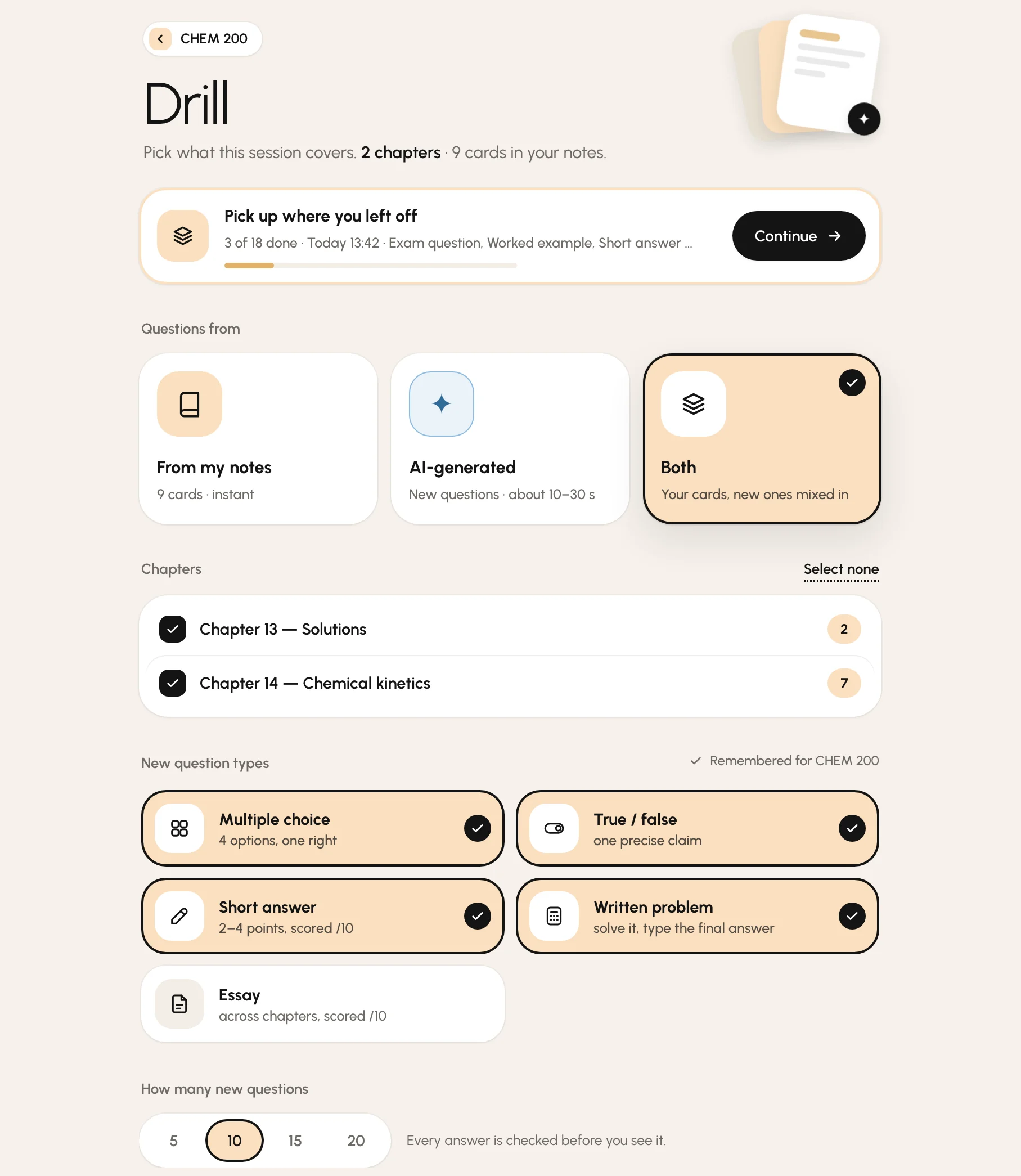
Drill's page for a chemistry course: a quiz left halfway, 3 of 18 done, with a Continue button; where the questions come from (my notes, AI-generated or both); the chapters; the question types; and how many new questions.
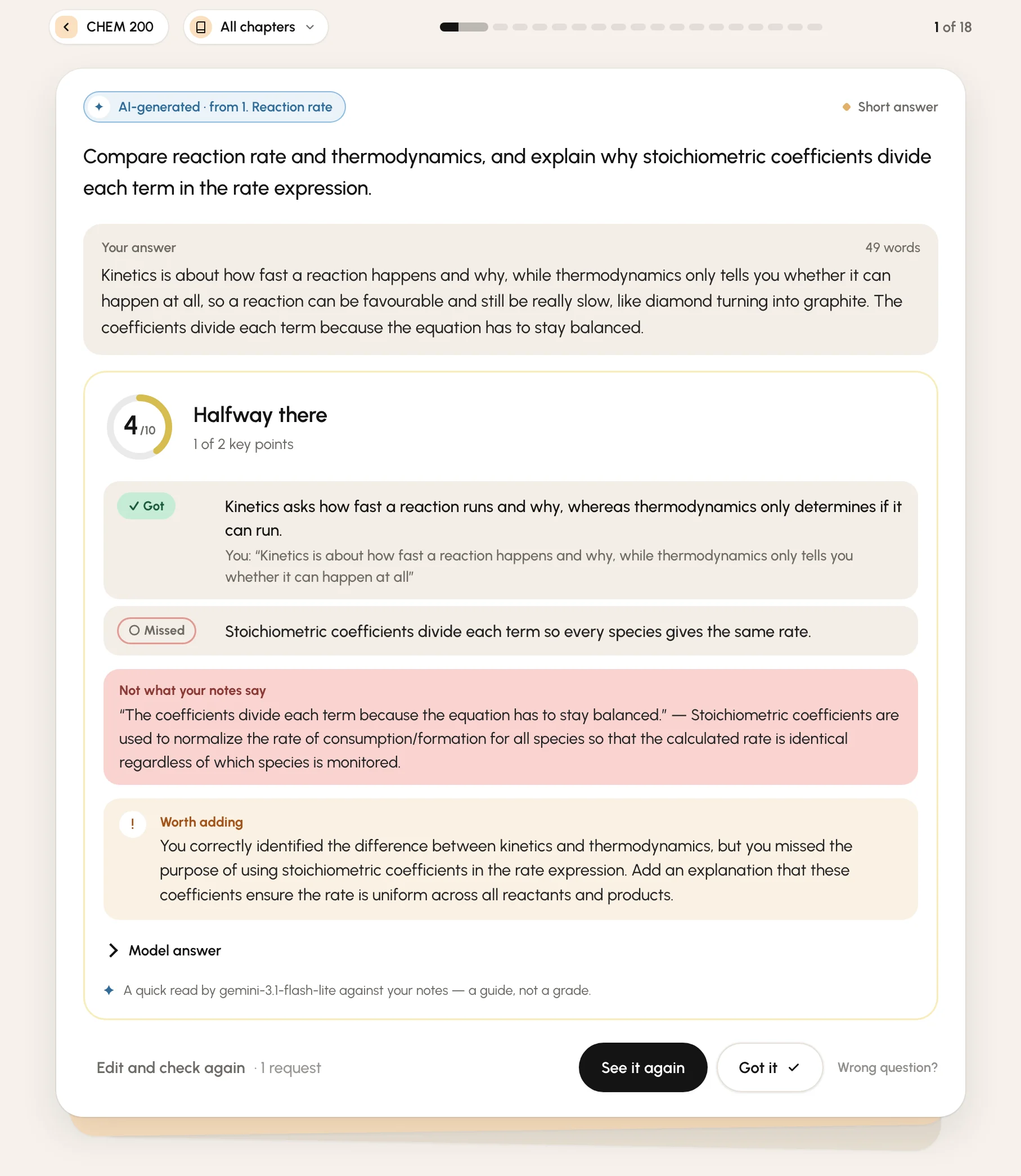
A short answer checked against the notes: scored 4 out of 10, one key point got with the student's own words quoted, one missed, a sentence the notes contradict next to what they say, and what to add.

Your course's exam, not a generic quiz.

Pick the kinds once per course: multiple choice and true or false for one, written problems for another. Use the questions already in your notes (instant, offline, free), new ones written from them, or both. Leave a quiz halfway and it waits for you; every quiz you take is kept to retake.

Write it out. Get it back point by point.

Short answers and essays come back scored out of ten against your notes: each key point got, partly or missed, quoted in your own words. Written problems are checked on your computer, rounding included, then show the worked solution.

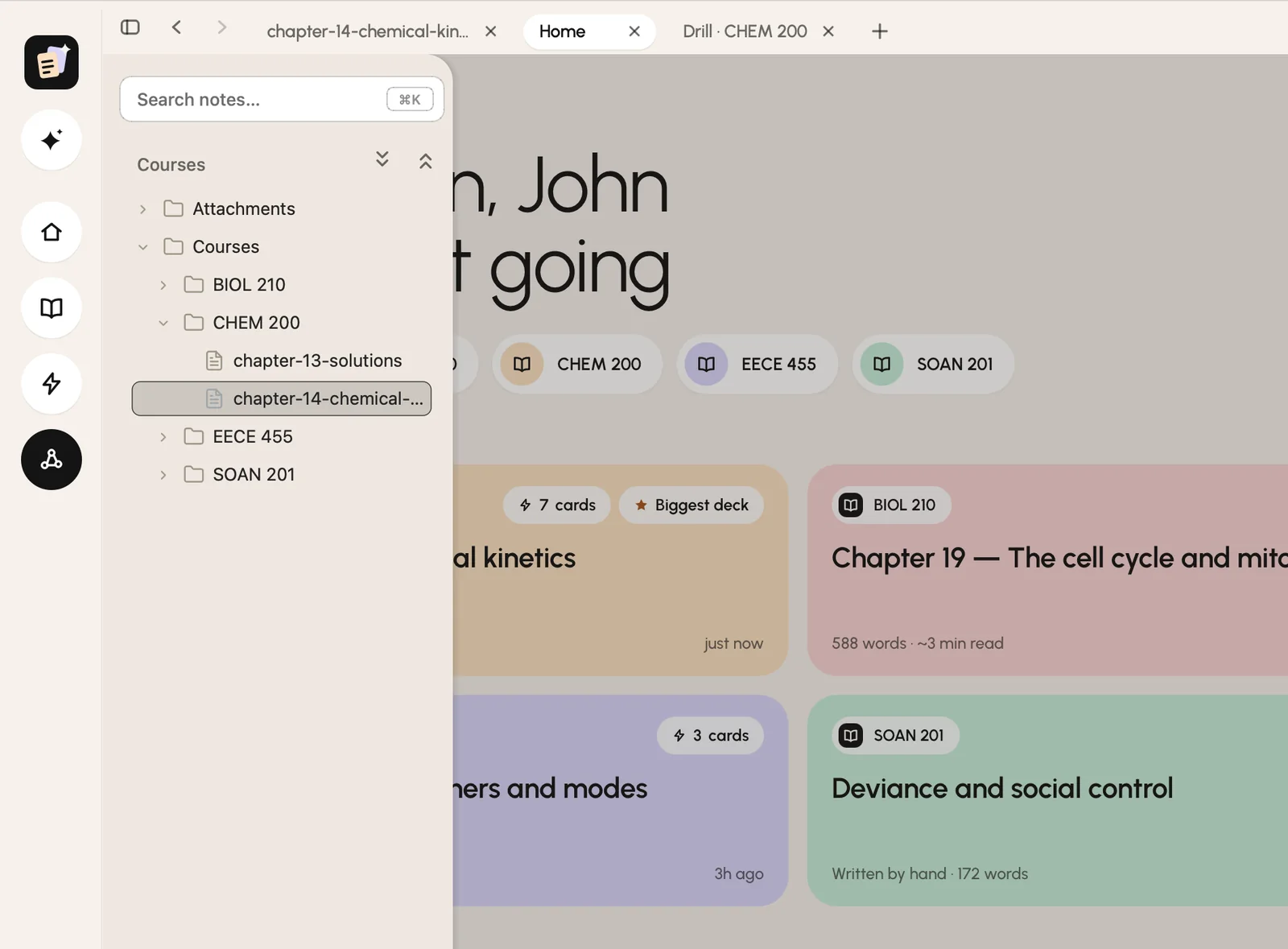
The library drawer open over the home screen: the vault's course folders and notes as a tree.

Your notes are files. Yours.

Everything lands as plain Markdown in a folder you choose. Put it in iCloud Drive and the notes are on your phone too. Any Markdown app opens the same files. Rename, move and trash notes from the app; the vault graph shows how they connect.

The sign-in is only so we know who's testing; the notes never go anywhere. Nothing to export either: if Notebot vanished tomorrow, your notes wouldn't notice.

  • Plain Markdown files, readable anywhere
  • iCloud Drive if you want it
  • A vault graph of notes and concepts

And the rest of a good study desk.

  • Enhance

    Typed notes in class? Enhance merges them with the lecture files into a full note, in place, and what you wrote counts as what the professor stressed.

  • Home

    Where you left off: recent notes as cards in their course's colour, your courses, this week's study time, a drill row per course.

  • Study time

    Minutes with a note open, per course, per day, as an honest bar chart. It has no streaks, goals or nagging.

  • Editor

    Press ⌘E and the note is raw Markdown. Every save is atomic and backed up, and a lint stops edits that would break your drill cards.

  • Vault graph

    Notes and the concepts they mention, drawn as a map you can pan and zoom. Big vaults stay smooth.

  • Updates, inside

    Once a day Notebot checks for a new version. When there is one, a line appears: What's new, Update. It swaps itself and reopens.

  • Watch to learn this

    Under a note, a short row of YouTube videos that match its topic, for when you'd rather hear it explained once more.

  • AI help

    Stuck on a line? Select it and tap ✦ for a simpler explanation, an example, or why it's true, right under the paragraph. Keep the ones that help.

Three steps, and the third one repeats.

  1. 1

    Install

    Open the download and drag Notebot into Applications. The first launch, macOS will say it can't verify the app, because it's made by one person, not the App Store. Open System Settings → Privacy & Security, press Open Anyway, once.

  2. 2

    Set up, once

    Sign in with Google, then Notebot asks four things: your name, a folder for your notes, your AI key (Gemini is free from Google AI Studio and what we recommend; a Claude or OpenAI key works too — Notebot recognises it and tests it live), and whether to download the 150 MB transcription model now. It runs on your computer.

  3. 3

    Drop a lecture

    Press ✦, drop the slides and the recording, pick the course, press Run. A recording adds a few minutes. The note opens when it's done. Then read it, search it, drill it.

Why Notebot asks you to sign in.

Private by construction. Free while it's in beta.

There is no Notebot server. There's your computer, your folder, and the AI's API under your own key — Google's Gemini by default, Anthropic's Claude or OpenAI if that's the key you paste.

Stays on your computer

  • Recordings, which are transcribed locally and never uploaded.
  • Your notes, in the folder you chose.
  • Your AI key, in a file only your account can read.
  • What you read, write and record. Nothing about your notes is ever sent.

What leaves your computer

  • When you press Run: the text and images of the slides you dropped, the transcript, and your photos go to your AI provider's API (Google, Anthropic or OpenAI — whichever key you pasted), under your key, to write the note.
  • When you ask for them: new Drill questions, a check of a written answer, or an AI-help explanation send the parts of your notes they're built from (and your answer, for a check) to the same API, under your key.
  • Once a day: a check-in with your account id, the Notebot version and the operating-system version, so we know the beta is alive. More on the sign-in.
  • Nothing else. Reading never touches the network, and neither does drilling the questions already in your notes.

What it costs

  • Nothing for Notebot while it's in beta. It will have a price one day; you'll hear about it inside the app first, and your notes stay yours either way.
  • Google's free tier gives about 500 requests a day on the model Notebot writes with. A lecture takes 2 to 16, ten new Drill questions usually 3 to 9, a checked answer or an explanation one. Notebot shows the estimate before every run and counts what's left.

Notebot 1.2.1 beta

macOS 12 or newer · Apple silicon · 395 MB

Download for Mac

Questions people ask before installing.

While it's in beta, yes. Notebot is being tested with a small group and costs nothing during that time; a paid version is planned, and you'll hear about it inside the app before anything changes. Notebot's AI features run under a key you create yourself. We recommend Google's Gemini: its free tier gives about 500 requests a day on the model Notebot writes with, a lecture takes 2 to 16, and no card is needed. If you'd rather use a Claude (Anthropic) or OpenAI key, Notebot takes those too; they're pay-as-you-go on your own account, and Notebot shows what each note cost.

Lecture slides as PDF or PowerPoint (.pptx), recordings (audio files), photos of the whiteboard, scans of handwritten pages, and your own typed notes as .md or .txt. Any mix, for one lecture, in one run. PowerPoint decks become full-slide pictures when LibreOffice (free) is installed; without it, Notebot uses the slides' text and the images inside them.

During the beta, yes: you sign in with Google when Notebot first opens. It's so we know who's testing and can reach you if something important changes. It records your name, email, version and last-opened day, and nothing about your notes. Here is exactly what it's for. You'll likely have a Google account anyway, for the free Gemini key.

Reading, searching, editing and drilling the questions in your notes all work offline, because the notes are files on your computer. Writing a note, new Drill questions, checking a written answer and AI help need the internet to reach your AI provider. Transcribing a recording is local either way.

Into the folder you pick during setup, as Courses/<course>/<note>.md, with images under Attachments/. It's an ordinary folder: back it up, put it in iCloud Drive, open the files in any editor.

Yes, as raw Markdown inside Notebot (⌘E), or in any other editor. Notebot never rewrites a note behind your back; saving is always explicit, and a daily backup is kept before the first edit.

Apple silicon Macs (M1 and later) on macOS 12 or newer. There is no Intel-Mac build right now. Windows is the next platform.

Because it's signed by its author, not notarised through Apple. Open System Settings → Privacy & Security and press Open Anyway once; after that it opens like any app, and updates arrive inside Notebot.